


Pizza Maker Kids Cooking Games
4.6146.00 Reviews
App Specs
- Version
- 3.1
- Updated On
- License
- Free
- Downloads
- 5,000,000+
- Developer
- Piggy Panda Inc
- Categories
- Role Playing
- Platform
- Android
Screenshots




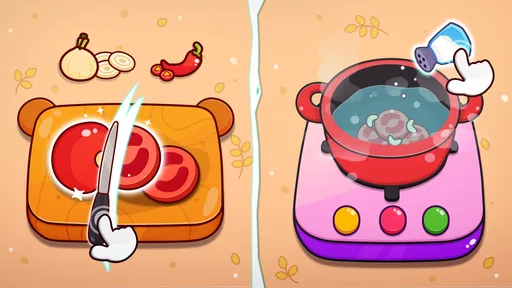

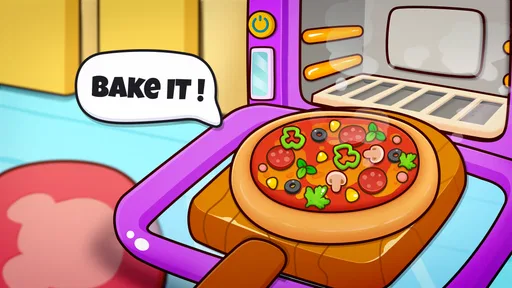

 Analysis by AppCompare
I like the idea of a cooking game that keeps its focus on one familiar food instead of asking me to learn a complicated set of rules. Pizza Maker Kids Cooking Games is a free role-playing game from Piggy Panda Inc, built around preparing and serving virtual pizzas. Its simple premise makes it an easy pick for a short, low-pressure play session, especially for children who enjoy making choices and seeing a finished creation. I’d treat it as playful screen time rather than a substitute for a deeper cooking or management game.
A relaxed pizza-making game for short sessions
The basic appeal is clear: choose a dough, add toppings, and bake the result. That loop is easy to understand, so a child can get started without needing a long explanation. The game is rated Everyone, and its approachable subject matter suits young players who like pretend cooking. I also think it can work well as a shared activity: an adult can ask a child to describe their topping choices, or let them make a pizza for a sibling and explain the result.
Quick play, with a simple rhythm
This is not the kind of role-playing game I’d choose for a long story or a complicated progression system. Its draw is the hands-on sequence of making food, with the player’s attention moving from preparation to baking. That makes the pace feel naturally suited to a few minutes at a time. If you’re looking for a game to fill a short wait or offer a calm break between other activities, the pizza-making theme is a more focused fit than a sprawling adventure.
For a more useful play session, I’d encourage a child to decide on a pizza idea before starting: a favorite topping, a color theme, or a combination they have never tried. That gives the activity a little purpose without turning it into a lesson. It also helps avoid aimless tapping when the novelty of choosing ingredients wears off. The game is at its best when the player is making small creative decisions, not simply rushing through the steps.
What to expect when play gets busy
The main activity involves several touches and choices, so a young player may need a moment to work out how to move from one stage to the next. I’d sit nearby the first time, especially for a child who is still getting used to touchscreen controls. After the sequence makes sense, the straightforward pizza theme should make it easier to pick up again. The key trade-off is that a simple loop is welcoming, but it may feel repetitive to someone who wants constant new goals or a changing challenge.
A practical way to keep the experience enjoyable is to take turns designing pizzas rather than asking one child to repeat the same process for a long stretch. One player can suggest a topping plan while another makes the choices, then swap roles for the next pizza. That adds conversation and variety without relying on features the game may not offer. It’s also a better fit for a shared family moment than treating the game as an open-ended activity that has to hold attention indefinitely.
Stability and device expectations
I would expect the game to feel light in concept because its central task is focused and easy to follow, but I wouldn’t make a promise about speed or battery use across every phone or tablet. Performance can vary with a device’s age and condition. The minimum requirement is Android 8.0, which gives Android users a clear compatibility check before installing. If a child is using an older device, it’s sensible to close other demanding apps first and see how the game behaves in a short trial.
Worth Reading Before You Choose

EA SPORTS FC Mobile 26 Is a Bigger Football Game, but It Takes Time

Flipboard Shows What News Apps Must Do Beyond the Feed

Switching to Android Auto Means Rethinking Your Driving Routine

Google Calendar Makes a Crowded Week Easier to Manage

Ludo King Makes the Most of the Minutes Between Plans

Baby Panda World Brings Quick Play to Modern Phones, but Its Game Library Feels Busy
If the game pauses or behaves unexpectedly, I’d first leave the activity and reopen it, then check whether the device has enough free space and whether other apps are competing for resources. Those are ordinary troubleshooting steps, not a guarantee that every issue will be fixed. For a child’s session, I’d also avoid beginning a new activity when the device is nearly out of battery; a sudden shutdown can interrupt play regardless of the game. A quick test before handing over the phone is a small way to prevent frustration.
The game has a 4.6 average from around 8,600 ratings and has passed 5 million installs, which suggests that many players have tried it. It is currently at version 3.1. Those figures can help set expectations about its audience, but they don’t tell me how it will run on a particular device or whether its play style will suit every child. I’d decide based on the simple cooking premise and try a brief session before making it part of a regular routine.
Who will enjoy it, and who may want something else
I’d recommend it most to children who like pretend kitchens, colorful food choices, and seeing a small task through from start to finish. It can also suit a parent looking for a gentle activity to share while chatting about ingredients or favorite meals. If the child is more interested in fast action, a competitive score chase, or a substantial story, this is probably not the right choice. A more goal-driven cooking game would better match someone who wants pressure, detailed restaurant management, or lots of changing objectives.
Compared with many role-playing games, this one places the emphasis on a familiar creative routine rather than character builds, exploration, or combat. Compared with a real cooking activity, it is cleaner and easier to start, but it cannot offer the sensory experience of handling dough or tasting the result. I see that as the main distinction: it works as imaginative play, not as a cooking tutorial. If the goal is to teach practical kitchen skills, making a simple pizza together in real life is the better option, with an adult handling the oven and sharp tools.
Cost, age suitability, and a sensible first try
The game is free to download, with in-app purchases listed from $1.99 to $59.99 per item. Since it is intended for a young audience, I’d check the purchase settings on the device before handing it to a child, and make clear that buying anything requires an adult’s permission. This is a useful precaution for any free game with optional purchases. The Everyone content rating describes its broad age suitability, but parents should still decide whether the game’s pace and screen-time fit their own household.
My practical recommendation is to try it together once, notice whether the child enjoys making choices rather than merely tapping through, and then decide whether it deserves a place in the regular rotation. That first session can also reveal whether the controls feel comfortable on your device and whether the game holds attention without prompting. If it does, the pizza theme offers an easy starting point for imaginative play; if not, a hands-on cooking activity or a game with clearer goals may be a better match.
Final thoughts on the experience
From the moment I launched the app, I was greeted with vibrant colors and a catchy jingle that instantly set a fun, playful mood. The interface is intuitive, making it easy for even the youngest chefs to navigate. You start by choosing your pizza base, and trust me, the options are endless. Thin crust, thick crust, gluten-free – you name it, they’ve got it.
Building the Perfect Pizza
Once you’ve picked your base, it’s time to get creative with toppings. Here’s where Pizza Maker Kids Cooking Games shines. With a plethora of toppings to choose from, ranging from classic pepperoni to exotic pineapple and even gummy bears, the app encourages creativity and experimentation. I found myself spending more time than I’d like to admit, crafting bizarre yet oddly satisfying pizza combos.
The drag-and-drop feature for adding toppings is smooth and responsive. It’s like a digital sandbox where you can let your culinary imagination run wild. The app also includes a handy guide for those who need a little inspiration, suggesting combinations that have been a hit with other users.
Cooking and Serving
After you’ve crafted your masterpiece, it’s time to cook it. The app guides you through a fun, interactive cooking process. You’ll slide your pizza into a virtual oven and wait as the magic happens. With realistic sound effects and animations, it almost feels like you’re in a real pizzeria. The anticipation builds as you watch the cheese melt and the crust turn golden brown.
Once your pizza is ready, it’s time to serve it up. This is where the app takes a delightful turn. You can serve your pizza to a variety of quirky characters, each with their own unique reactions and preferences. It’s incredibly satisfying to see them enjoy your creation, and their feedback adds a humorous touch.
Learning Through Play
While the app is undeniably fun, it’s also educational. It teaches kids about different ingredients, cooking processes, and encourages them to think creatively. The app doesn’t just stop at pizzas – it offers a variety of mini-games and challenges that keep users engaged and learning. From memory games to ingredient matching, there’s always something new to explore.
Parents can feel good about letting their kids spend time on this app, knowing it’s both entertaining and educational. Plus, it fosters a love for cooking that might just inspire them to try their hand at making real pizzas one day.
Closing Thoughts
All in all, Pizza Maker Kids Cooking Games is a delightful app that captures the joy of cooking in a playful and creative way. It’s perfect for kids who love to experiment and adults who want a feel-good break from reality. Whether you’re a pizza purist or a culinary adventurer, this app has something for everyone.
So why not give it a whirl? Dive into the world of pizza making, and who knows, you might just discover your inner chef.
Pros
- Fun and engaging for young children.
- Simple interface easy for kids to use.
- Encourages creativity with pizza designs.
- No in-app purchases required.
- Ad-free experience for uninterrupted play.
Cons
- Limited pizza topping options.
- Repetitive gameplay after a while.
- No multiplayer or social features.
- Graphics could be more detailed.
- Limited to basic cooking mechanics.
FAQs for Pizza Maker Kids Cooking Games
What is Pizza Maker Kids Cooking Games?
Pizza Maker Kids Cooking Games is an interactive app designed for children to learn the basics of making pizza. It offers a fun and engaging way for kids to explore different ingredients, recipes, and cooking techniques in a virtual kitchen environment. The game encourages creativity and learning through play.
Is Pizza Maker Kids Cooking Games safe for children?
Yes, the app is designed with child safety in mind. It features age-appropriate content without any ads or in-app purchases that could lead to unexpected charges. Parents can feel confident allowing their children to explore the app independently, knowing it provides a safe and educational experience.
What age group is Pizza Maker Kids Cooking Games suitable for?
The app is primarily aimed at children aged 4 to 8 years. It features easy-to-understand instructions and simple controls, making it accessible for younger children who are just starting to explore digital cooking games. The colorful graphics and interactive elements are designed to capture and hold a child's attention.
Does Pizza Maker Kids Cooking Games require an internet connection?
No, Pizza Maker Kids Cooking Games can be played offline, making it a convenient option for families on the go. Once downloaded, children can enjoy the full range of activities and features without needing an internet connection, allowing for uninterrupted play even in areas with limited connectivity.
Are there any educational benefits to using Pizza Maker Kids Cooking Games?
Absolutely, the app offers several educational benefits. It helps children develop basic cooking skills, enhances their understanding of food ingredients, and fosters creativity and imagination. Additionally, it can improve problem-solving abilities and fine motor skills as children navigate different cooking tasks and recipes.


